Tell your panel customers what's new.
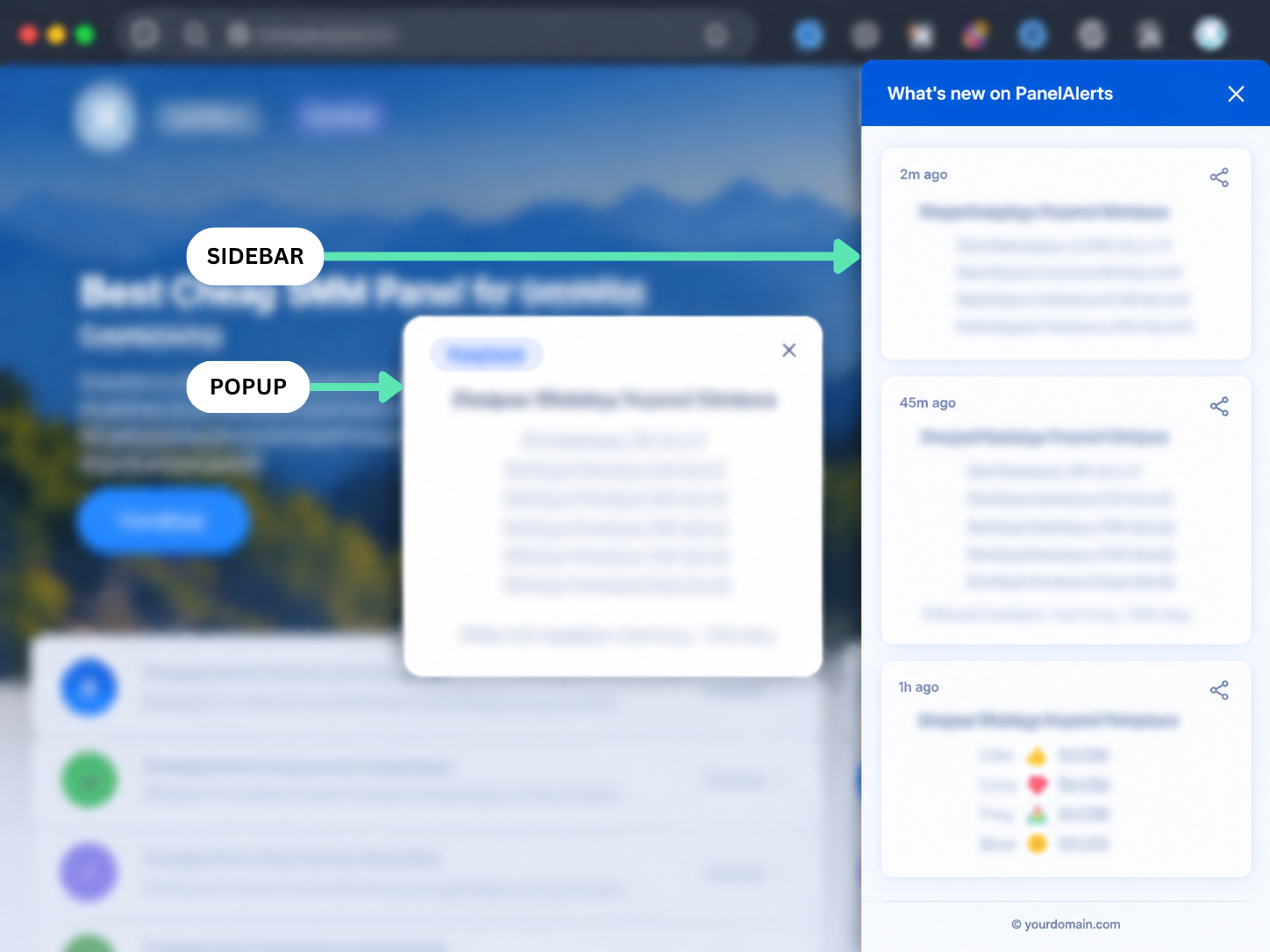
PanelAlerts adds a notification sidebar and popup to your SMM panel website. Post service updates, new services, promos or maintenance notices — your customers see them the moment they visit.
Free plan available · No credit card required
VS BEAMER
Same idea. A fraction of the price.
Beamer is the most popular tool for this — but it charges SMM panel owners $99/month for popups. PanelAlerts does the same job, built specifically for panels, starting free.
| Feature | PanelAlerts | Beamer |
|---|---|---|
| Sidebar notification widget | ✓ | ✓ |
| Popup announcements | ✓ | ✓ |
| Post types (New, Promo, Notice) | ✓ | ✓ |
| Schedule and draft posts | ✓ | ✓ |
| Widget views analytics | ✓ | ✓ |
| Built for SMM panels | ✓ | ✕ |
| Free plan available | ✓ | ✕ |
| Starting price | FreePaid from 11/month | $49–$300/month · popup requires paid plan |
Clear feature-by-feature comparison — no hidden rows or separate feature tiers.
HOW IT WORKS
From install to live updates in about 10 minutes.
One simple setup, a quick content workflow, and a clear installation guide — everything you need to get PanelAlerts live on your panel.
Three steps. Then you're live.
~10 MINUTESInstall the widget
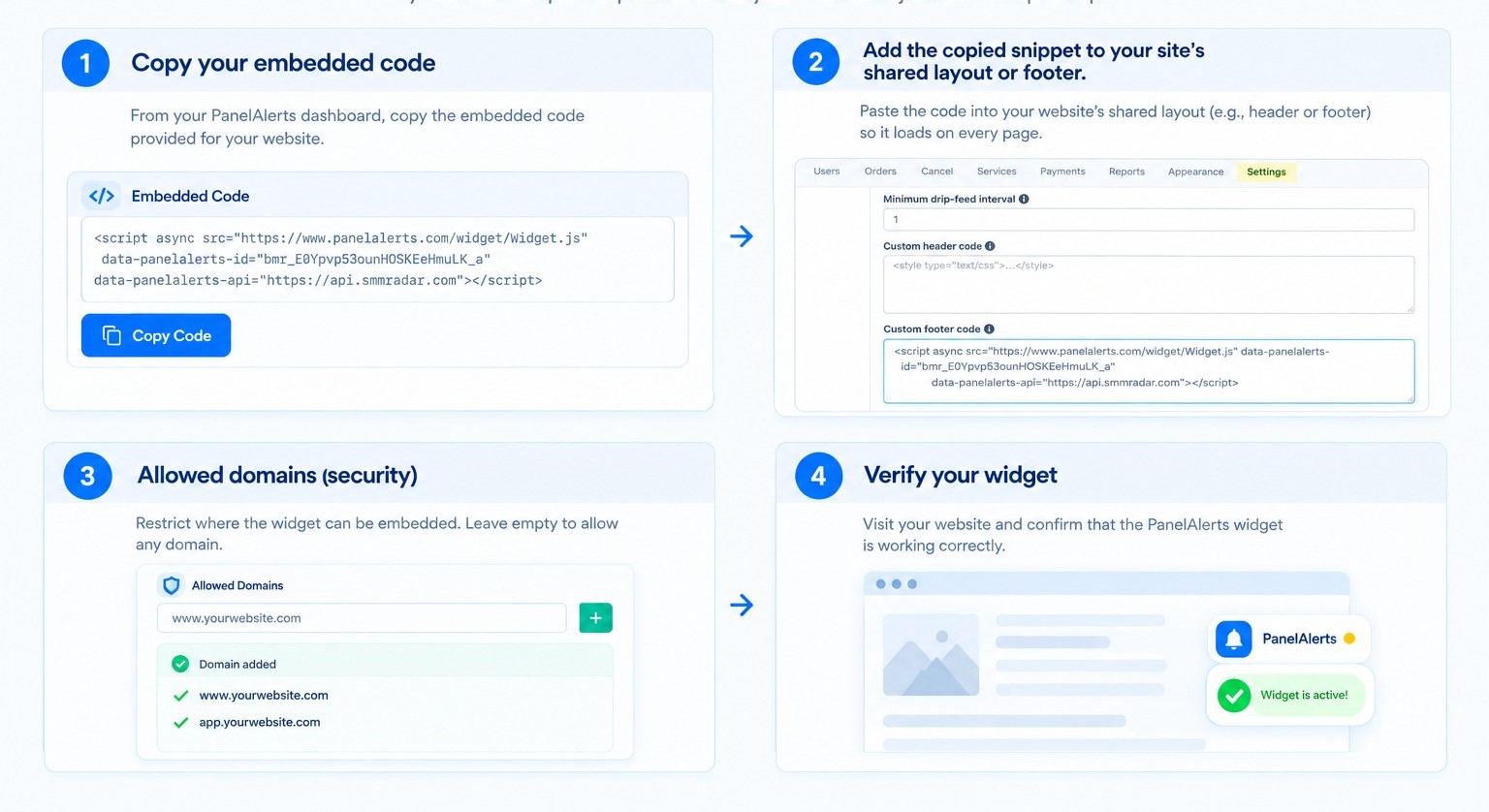
Copy your embed code from the dashboard and add it to your panel site's shared layout or footer. No developer needed.
Write your update
Create a post, choose New Service, Promo or Notice, then decide whether it appears as a sidebar notification, popup or both.
Publish. Customers see it.
Publish your update and visitors see it immediately on your panel. No refresh, email or extra action is required.
Install PanelAlerts in four steps
Use this visual guide for the exact setup flow.
FEATURES
Everything you need to keep customers informed.
All features available on every plan including free — the only difference is whether PanelAlerts branding shows in the widget footer.
Sidebar Widget
A clean notification panel appears on the side of your website. Customers open it to see all your latest updates in one place.
Popup Announcements
Important news appears as a popup the moment someone visits your site. Perfect for launches, promotions and urgent notices.
Post Types
Choose the right type for every update — New Service, Promotion or Notice. Keeps your feed organized and easy to scan.
Schedule Posts
Write your post now and set it to go live at any future date and time. Plan your service announcements in advance.
Widget Analytics
See how many times your widget was loaded, how many posts were viewed and how many customers clicked through.
Full Customization
Match PanelAlerts to your panel's brand. Set your own colors, header text, widget position and border radius.
Pin and Feature Posts
Keep the most important update at the top of your feed. Feature a post to highlight it differently in the widget.
Post Expiry
Set an expiry date on any post. Time-limited promotions and maintenance windows disappear automatically when they end.
Domain Security
Restrict your widget to specific domains. Only your panel site can load your notifications — nothing is exposed publicly.
PRICING
Simple. Honest. No surprises.
Start free — all features included. Choose a plan only when you need more capacity or want to remove PanelAlerts branding.
What does the free branding look like?
On the free plan, a small "Powered by PanelAlerts" text link appears in the footer of your sidebar widget — similar to how many free tools work. It is subtle, sits at the bottom, and does not interfere with your posts or your panel's design. Upgrade to Starter ($11/month) to remove it completely.
Start updating your customers today.
Free to install. No card needed. Live on your panel in 10 minutes.
Get PanelAlerts free